
How to Implement Upsell to a New Shopify Store
All the aspects you need to learn in order to implement upsell to a new Shopify store.
You’ve finally launched your Shopify store. It looks great, the products are live, and the traffic is starting to trickle in.
But then you hit the harsh reality: Customer Acquisition Costs (CAC) are eating your entire profit margin. If it costs you $40 to get a customer who only spends $45, you aren't building a business, you're just breaking even.
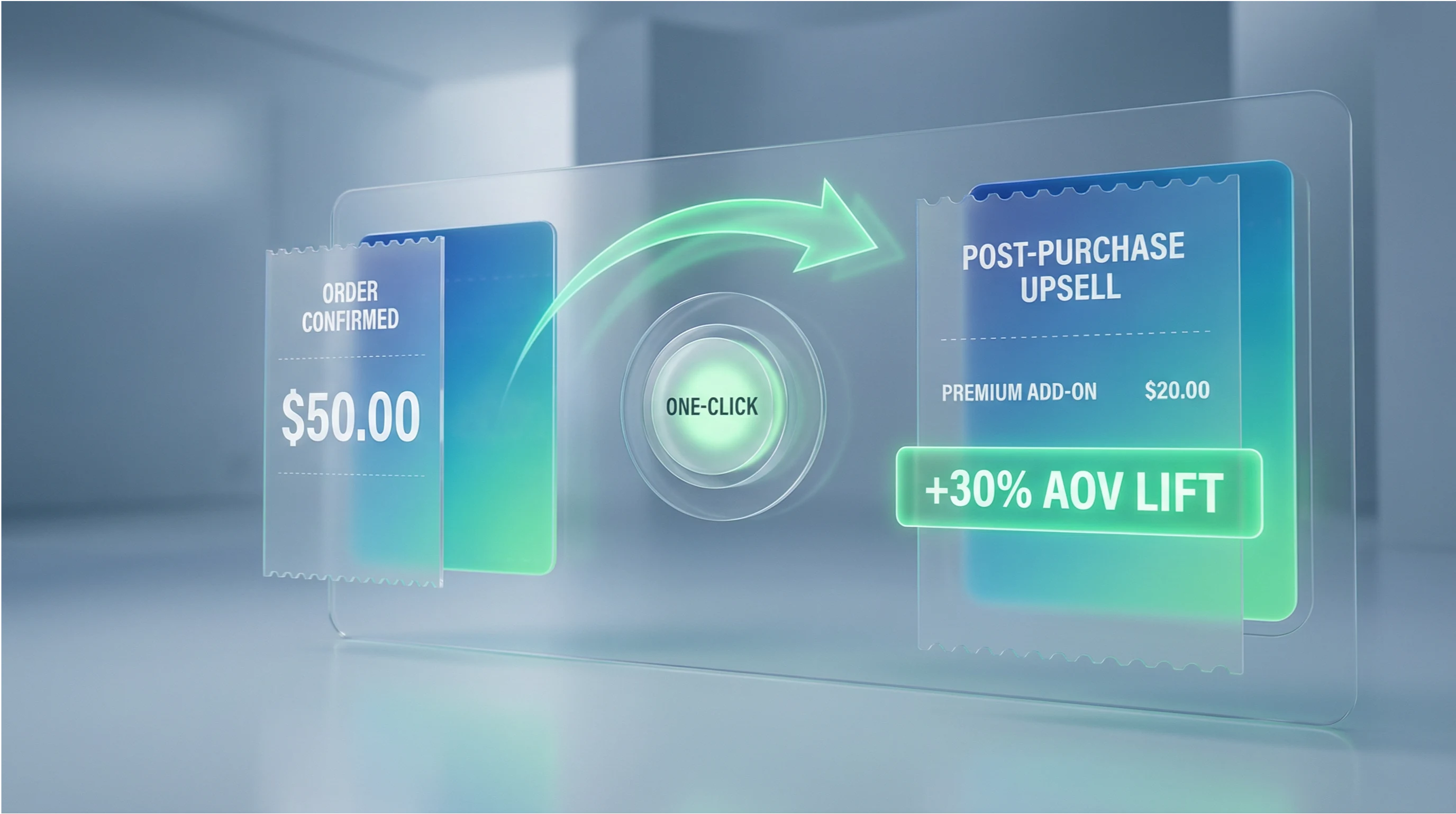
The solution isn't just "selling more" but upselling smarter. Specifically, using a Shopify post purchase upsell strategy. This is the exact method that top-tier brands use to increase their Average Order Value (AOV) by 15-30% without ever risking the initial sale.
In this guide, we'll explore how to successfully implement upsell to a new Shopify store. We’ll also break down why Cart-X is widely considered the best upsell app for Shopify in 2026, and show you exactly how to get your first high-converting funnel live in under 10 minutes; no coding required.
Why New Stores Need Upselling from Day One

The math for a new Shopify store is often brutal. Imagine spending $50 on a Meta ad just to acquire one customer. If that customer buys a $50 product, you haven't broken even; you’ve lost money. Once you factor in COGS (cost of goods sold), shipping, and those 2.9% + $0.30 processing fees, your "success" is actually a net loss.
This is the primary reason most stores fail. They obsess over acquisition but ignore the post-purchase value of the transaction. You simply cannot scale a brand if every sale barely covers its own cost.
The Math of the "Second Sale"
A post purchase offer flips this script by adding $10 or $20 to an order without requiring a single cent in extra ad spend. You aren't hunting for new traffic; you are simply maximizing the customers you already paid for.
Let’s look at the numbers. If you maintain a 20% conversion rate on a $25 one click upsell, you’ve effectively added $5 to your AOV across every single purchase in your store. For a merchant processing 200 orders a month, that is an extra $1,000 in high-margin revenue. Over a year, that’s $12,000 in "found" money.
Zero Risk, High Reward
The beauty of this model is that it carries zero risk. Because the offer appears after the initial checkout is complete, the original sale is already locked in.
If the customer declines, they still get their order. You aren't gambling with cart abandonment or distracting them with pop-ups during the checkout process. You are just capturing value from a buyer who is currently in a purchasing mindset.
The Cart-X Advantage: Growing 2.3x Faster
At Cart-X, we analyzed data from over 1,500 Shopify stores, and the trend is undeniable. Merchants who implement post-purchase upsells during their first month see a 25% higher AOV compared to those who wait.
Think of it as the compound interest of e-commerce. Early adopters grow 2.3 times faster in their first year. While "Store A" is waiting six months to optimize, "Store B" is already using that extra profit to outbid competitors on ads. Starting early isn't just a "nice to have"; it is how you survive the first year.
Pre-Purchase vs. Post-Purchase Upsells: Which Should You Start With?
When you start upselling, you face a critical choice: do you show the offer before the customer pays, or after? The difference determines whether you're growing your revenue or accidentally sabotaging it.
Pre-Purchase: High Visibility, High Risk
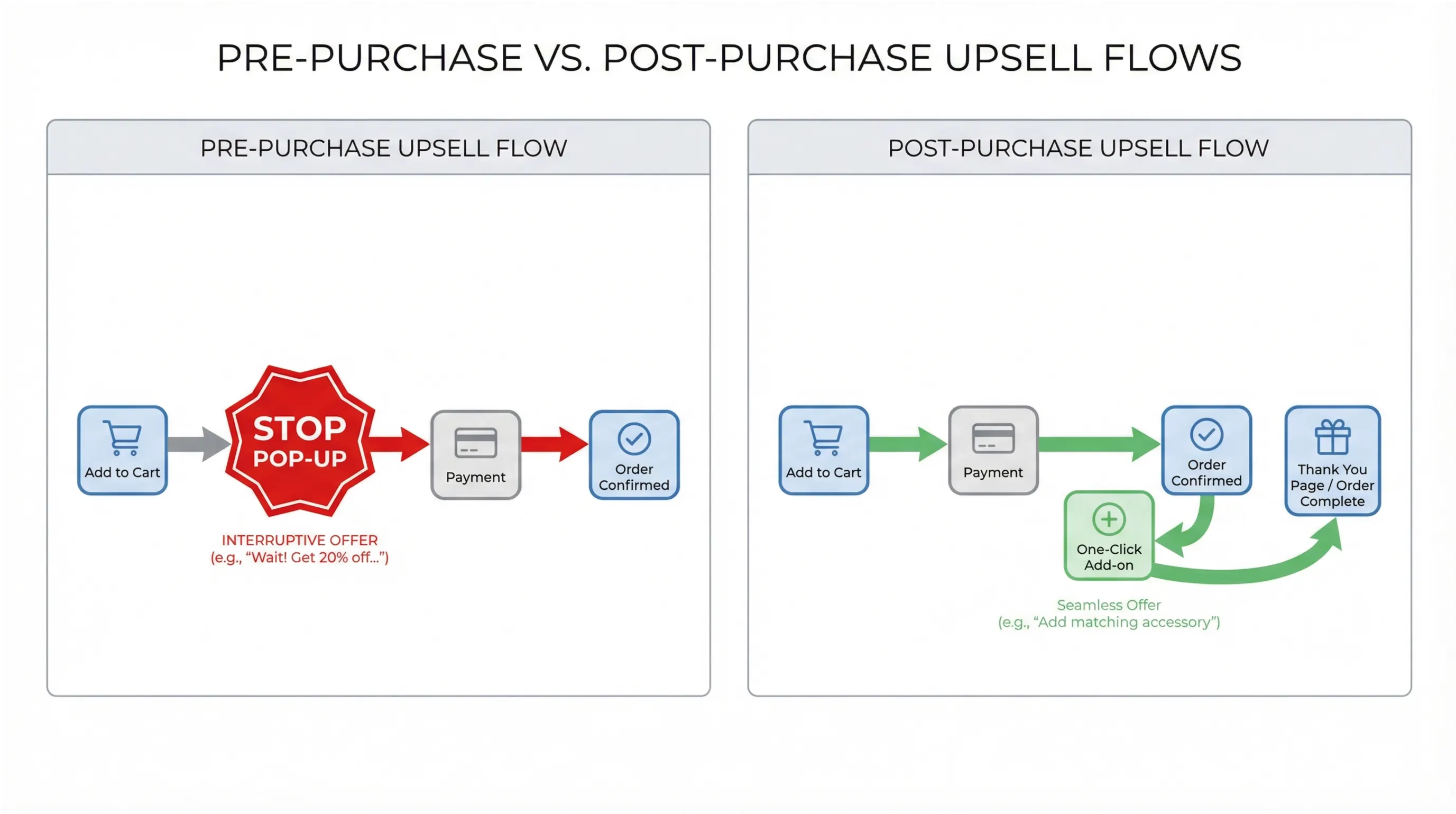
A pre-purchase upsell pops up on the product page or inside the cart. While it's true that every shopper sees these offers, you are introducing friction at the worst possible moment.
Consider your own shopping habits. You’ve finally decided to buy; you're heading to the checkout, and suddenly a pop-up suggests three more items. What happens? Frequently, you second-guess the original purchase or get distracted and abandon the cart entirely. The data from 2025 confirms this: pre-purchase offers convert at just 2-5%. For a new store, you are gambling with your core conversion rate to chase a low-probability add-on.
Post-Purchase: The Risk-Free Winner
Shopify post purchase upsells work differently. The offer appears after the customer has paid, usually in that "limbo" between the checkout and the thank-you page.
This changes the psychology of the sale:
- The sale is locked in: The credit card has already been charged. There is zero risk of cart abandonment.
- Zero friction: Since the customer already trusted you with their payment info, they can add the new item with a single click without re-entering their card details.
- Peak Buying Mode: The customer is already in a "yes" mindset. This is why post-purchase offers convert at 10-15% (and often up to 18% for physical goods); three times higher than pre-purchase.
The Verdict: For a new Shopify store, this isn't even a contest. Post-purchase gives you the highest possible conversion rates without the "soul-crushing" fear of watching your initial sales disappear.
Best Upsell App for Shopify: What to Look For (And Why Cart-X Wins)
There are dozens of upsell apps on Shopify. Most promise the same results: more revenue, higher AOV, and easy setup. But for a new store, you need something specific. You need an app that doesn't require a developer, won’t slow down your site, and actually converts visitors into repeat buyers.
What Makes a Great Upsell App for New Stores?
Most apps check two or three of the following boxes. To protect your margins and your customer experience, you need an app that hits all six:
- One-click checkout: Customers shouldn't re-enter payment info. That friction kills conversions.
- Post-purchase positioning: Offers must appear after payment to ensure zero risk to your initial sale.
- No coding required: You need a drag-and-drop setup, not a developer bill.
- Native Shopify integration: The app should be built on Shopify Checkout Extensibility for maximum speed and reliability.
- Works on all plans: You shouldn't be forced to pay for Shopify Plus ($2,000/month) just to access high-converting upsells.
- Clear analytics: You need to track conversion rates, revenue, and AOV in real-time without guessing.
Why Cart-X Is the Best Choice for New Stores
Cart-X is the only solution designed to meet all these criteria for merchants in their first six months of business. By leveraging Shopify’s native Checkout Extensibility, it creates true 1 click upsell experiences.
When a customer sees your offer on the thank you page, they click "Yes" and the product is instantly added to their existing order. There is no payment re-entry and no second checkout flow. This matters because every extra step you add to a checkout typically drops your acceptance rate by 20-30%. Cart-X removes that friction entirely.
Proven Results: The Flex Moves Case Study
The results aren't just theoretical. Cart-X currently powers upsells for over 1,500 Shopify stores, generating more than $10 million in total upsell revenue. On average, merchants see post-purchase conversion rates between 10-15%.
Take Flex Moves, a fitness apparel brand. They implemented Cart-X in their first month to offer complementary resistance bands after leggings purchases. In just 90 days, they generated $10,800+ in upsell revenue with a 14% conversion rate and a 22% total increase in AOV.
The Bottom Line
While competitors like Aftersell offer similar features, Cart-X’s native integration makes it faster and more reliable for stores that aren't on Shopify Plus. You can create your first funnel in under 10 minutes: pick a product, set a discount, and hit activate.
Ready to try it? Install Cart-X from the Shopify App Store and start your free trial to see the impact on your AOV firsthand.
5 Shopify Post-Purchase Upsell Strategies for New Stores
Not all upsells work the same. Some convert at 15%, while others barely hit 5%. For new stores with limited catalogs, you need approaches that are simple to implement but proven to convert.
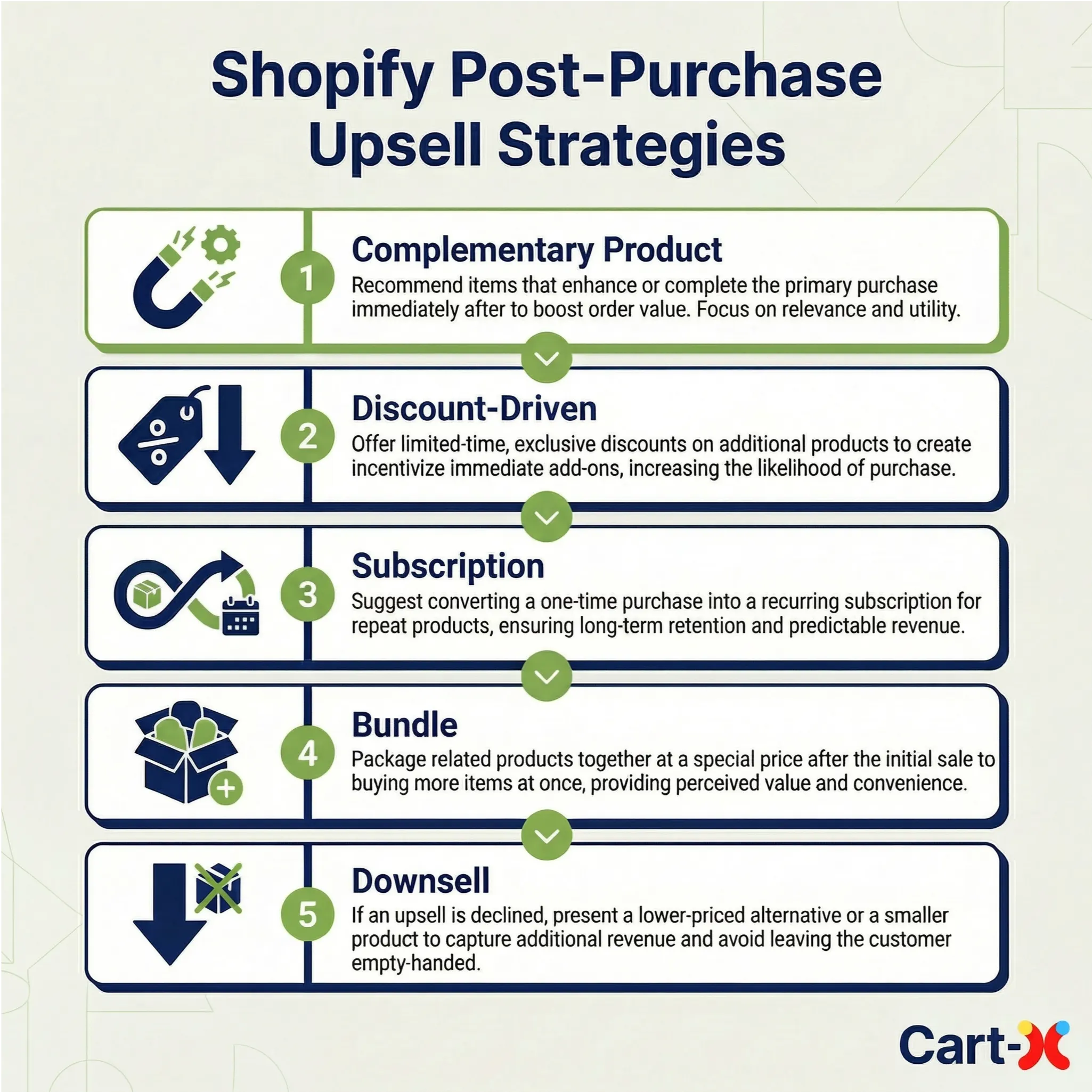
Here are the five strategies that consistently deliver results, ranked by conversion rate and ease of setup.
Strategy 1: The Complementary Product Offer
This is the highest-converting strategy in e-commerce. You offer a product that naturally pairs with what the customer just bought. Think: Phone case → Screen protector. Workout leggings → Resistance band. Coffee beans → Travel mug.
The pairing is obvious, so the decision requires almost no thought. This strategy converts between 12-15% because it feels like a helpful suggestion rather than a sales pitch. If you aren't sure which items to pair, checking out a guide on proven upsell strategies can help you find the highest-converting combinations for your specific niche.
- Best for: Any store with logical product pairings.
Strategy 2: The Discount-Driven Upsell
By offering a related product at 20-30% off immediately after purchase, you transform an upsell into a "reward." Using a copy like, "As a thank-you, get our best-selling [product] for 25% off," makes the offer feel exclusive.
The customer is already in "buying mode," and the 1 click upsell removes every ounce of friction. This combination typically converts at 10-13%.
- Best for: Stores with high-margin products where you can afford the discount.
Strategy 3: The Subscription Conversion
If you sell consumables, this is how you stop chasing new customers and start building recurring revenue. You offer to turn their one-time purchase into a subscription at a 15-20% discount.
While this converts lower (8-10%), the lifetime value (LTV) is 3-5x higher. You aren’t just adding $20 to one order; you’re adding $20 every month for the next year.
- Best for: Food, supplements, beauty, and pet supplies.
Strategy 4: The Bundle Upgrade
This increases perceived value by offering a complete set. If a customer buys a skincare serum, you upsell the full three-step routine at a 30% bundle discount. Customers feel like they’re getting a total solution rather than just one piece of the puzzle. This converts at 9-12%.
- Best for: Product lines that work best as a set or progression.
Strategy 5: The Downsell Safety Net
This is your "second chance" revenue. If a customer declines your first offer, you immediately show a cheaper alternative. If they decline a $60 bundle, offer a $20 single add-on.
This captures customers who liked the idea of an add-on but found the first price point too high. It converts at 5-8% on the downsell—revenue you would have otherwise lost entirely.
- Best for: Stores with a wide range of price points.
What Do You Need Before You Start Upselling?
You don't need much to start upselling. Forget the idea that you need thousands of products, massive traffic, or a $2,000/month Shopify Plus account. Here is the reality:
The Checklist:
- ✅ An active Shopify store – Any plan works. Basic ($39/mo), Shopify, or Advanced.
- ✅ At least 2-3 products – You only need one solid pairing for your first funnel.
- ✅ Identified upsell products – Use "Strategy #1" (Complementary) as your guide.
- ✅ 10 minutes of time – Genuinely, that is all it takes to get live.
What You DON’T Need:
- ❌ Shopify Plus – Cart-X works natively on the Basic plan.
- ❌ Coding skills – The setup is entirely drag-and-drop.
- ❌ Existing traffic – Set it up now so that your store is ready to maximize every dollar when your first visitors arrive.
Pro Tip: Identify your highest-margin products first. A product with a 50% margin can handle a 25% "thank you" discount and still leave you with 25% pure profit on the upsell.
Step-by-Step: How to Implement Your First Upsell with Cart-X
This is the exact process to set up your first post purchase upsell. I’ll walk you through every click so that by the end of this section, your funnel is ready to convert.
Step 1: Install Cart-X (2 Minutes)
Search for "Cart-X" in the Shopify App Store. Click "Add app," then "Install app." Shopify will ask for permissions to display offers on your checkout page—this is standard for any upsell app Shopify merchants use to enable one-click purchases. You’ll land in the Cart-X dashboard, which is built to be clean and jargon-free.
Step 2: Create Your First Funnel (3 Minutes)
Click "Create Funnel" and name it something like "Global Thank You Offer."
- Choose your trigger: Select "All Products." This ensures every customer gets an offer. You can get surgical with product-specific funnels later once you have more data.
Step 3: Select Your Upsell Offer (2 Minutes)
Browse your catalog and pick your complementary item.
- The Rule: Pick a product with at least a 30% profit margin. If you sell coffee, pick a travel mug. If you sell supplements, pick a shaker bottle. Click "Add to Funnel."
Step 4: Set Your Discount (1 Minute)
Toggle "Enable Discount." We recommend a 20-30% percentage discount. Why? Cart-X data shows that discounted upsells convert 40% better than full-price offers. It makes the upsell feel like a reward for buying, not a pushy sales pitch.
Step 5: Customize the Design (3 Minutes)
Click "Design Editor." You want the offer to feel like a natural extension of your brand.
- Headline: Try "Wait! Complete Your Set" or "One More Thing..."
- Button Text: "Yes, Add to My Order" consistently outperforms a generic "Buy Now."
- Mobile Check: 60% of your traffic is on mobile. Ensure the design looks clean on a small screen before saving.
Step 6: Activate and Test (2 Minutes)
Flip the "Activate" toggle. Your funnel is live. Crucial: Place a test order. Go through the checkout, pay, and ensure the upsell appears before the thank-you page. Click "Yes" to confirm the 1 click upsell functions perfectly. If it does, you're officially making more money per customer.
Best Practices for New Store Upsells
You’ve got your first funnel live. Now let's make sure it actually performs. To get those "Excellent" tier results, you need to treat upselling as a process of optimization, not a "set it and forget it" task.
Choose the Right Products to Upsell
Not every product makes a good upsell. You need items that are complementary, not competing. Don’t offer a replacement for what the customer just bought; offer something that enhances it.
- The 50% Rule: Keep the upsell price at 30-50% of the original purchase. Someone who just spent $50 is unlikely to add a $75 item on a whim. But a $20 add-on? That’s an easy "yes."
- Run the Math: Ensure your margins support the discount. If you’re offering 25% off, you need at least a 30-40% profit margin to stay in the green.
Start Small, Scale Fast (The 4-Week Roadmap)
Don’t launch ten funnels on day one. Start simple and iterate:
- Week 1: Launch one funnel with your best complementary product pairing.
- Week 2: Analyze. If your conversion rate is above 8%, you're doing well. If it's lower, test a different product or a deeper discount.
- Week 3: Create a second funnel for your next top-selling product.
- Week 4: Add a "Downsell" to your first funnel to capture customers who declined the initial offer.
The Benchmarks: How Do You Stack Up?
Cart-X gives you a real-time dashboard to track your performance. Here is what "good" looks like in 2025/2026:
- Good: 8–10% conversion rate
- Great: 12–15% conversion rate
- Excellent: 15%+ conversion rate
5 Common Shopify Upsell Mistakes (And How to Avoid Them)
Most new stores make the same mistakes that kill their conversion rates. Here is how to stay ahead of the curve:
- Upselling a More Expensive Product: If they bought $50 leggings, don't offer a $100 yoga mat.
The Fix: Stick to the 30-50% price rule.
- No Discount on the Offer: Full-price upsells feel like a cash grab.
The Fix: Always offer a 20-30% "thank you" discount. Cart-X data shows this converts 40% better.
- Irrelevant Pairings: Offering a yoga mat to someone who bought coffee beans destroys trust.
The Fix: Use the "Would they use these together?" test.
- Waiting Too Long to Start: This is the most expensive mistake. A store doing $10k/month without upsells is losing ~$5,000 a year in "free" revenue.
The Fix: Get your first funnel live this week.
- Overcomplicating the Copy: Long paragraphs overwhelm the buyer.
The Fix: Keep it simple. "Wait! Add [Product] to your order for 25% off. [Yes, Add to My Order]"
Conclusion: Why the Second Sale Matters
We’ve covered a lot of ground, but the core takeaway is this: Post-purchase upselling is one of the lowest-risk ways to grow a new store. You aren't gambling with your conversion rate or distracting customers who are trying to pay. You’re simply offering a relevant "one-click" extra after the hardest part of securing the initial sale is already finished.
The Reality of the Results
- A Grounded Conversion Lift: While pre-purchase offers often convert at a modest 2–5% because they can interrupt the flow, post-purchase offers typically see a higher engagement of 10–15% because the buyer already trusts your brand.
- Built for Shopify Merchants: We designed Cart-X to be a reliable upsell app for Shopify owners who need results without a technical headache. It integrates natively with your checkout to keep things fast, professional, and consistent across all devices.
- Understanding Opportunity Cost: For a store doing $10,000 in monthly volume, even a conservative 5% lift from a simple upsell adds up over time. It’s not about getting rich overnight; it’s about ensuring that as you spend money on ads to drive traffic, you are maximizing the value of every single visitor who converts.
Ready to see how a simple funnel impacts your AOV? Install Cart-X from the Shopify App Store. Start your free trial and get your first "Complementary Product" offer live in about 10 minutes.
FAQ: Implementing Upsells on New Shopify Stores
Do I need Shopify Plus to add upsells?
No. Cart-X works on all Shopify plans—Basic ($39/month), Shopify, Advanced, and Plus. You don't need a $2,000/month plan to start upselling.
Will upsells slow down my store?
No. Cart-X is built natively on Shopify's Checkout Extensibility. This means zero impact on page speed or checkout performance.
How long does setup actually take?
About 10 minutes for your first funnel. Once you're familiar with the dashboard, you can create new funnels in under 5 minutes.
What if customers don't accept the upsell?
Nothing changes. The original sale is already complete and the payment is processed, so there is zero risk to your conversion rate. If they decline, they just proceed to the thank-you page as usual.
Do I need a huge product catalog?
No. You can start with just 2-3 products. As long as you have one logical, complementary pairing, you are ready to launch your first funnel.
Book a demo – If you’d prefer a guided tour, we can show you exactly how these pairings look in action for a store in your specific niche.
Don't miss out on expert e-commerce and marketing insights! Subscribe to our newsletter for valuable tips in just a few clicks.

.svg)


